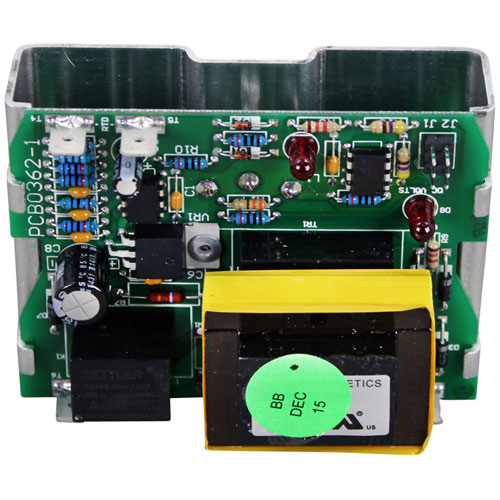

Southbend 1175025 Oven Control Board W/ Potentiometer & Bracket
$274.12
Price reduced from
$525.13
Specifications:
| Attribute | Details |
|---|---|
| Control Board W/ Potentiometer & Bracket | |
| Pot Has 1/4" Round Stem | |
| 8Ea 1/4" Tab Terminals | |
| Pointer Dial To Use A2644, # 22-1255 | |
| Southbend "Cook Only" | |
| Oven Series | Eb, Es, Gb, Gs, Sleb, Sles, Slgb, Slgs. |
| *All Units Must Have "Sc" (Standard Control) Suffix. | |
| For Temp Probe Use # 44-1220 |
Description
The Southbend 1175025 Oven Control Board with Potentiometer & Bracket is the most used and needful spare parts and its main function is to maintain an appropriate temperature. The dimensions of this component is 3.5 inches x 2.5 inches x 3 inches, which makes it small and sturdy and will perfectly fits. This is adjustable to give precise settings while the bracket is robust for firm fixing. This board helps to maintain a consistent cooking temperature, extends the life duration, which makes it a great investment for restaurants or home chefs seeking to keep their oven in the better shape.
More Information:
- MIDDLEBY MARSHALL:1181998||SOUTHBEND:1175024 ,1175025 ,1181998 ,SOU1175024 ,SOU1181998||STAR MFG:1181998
Step1: Turn off the oven and disconnect it from power to prevent electric shock.
Step2: Remove the control panel cover to access the existing control board.
Step3: Label and disconnect all wires from the old board.
Step4: Unscrew and remove the old unit, then mount the new board with the bracket.
Step5: Reconnect wires to matching terminals and secure connections.
Step6: Reassemble the panel, restore power, and test oven operation.
Customer Reviews
No reviews yet. Be the first to write one!
Write a Review
Thank you! Your review has been submitted.
-
What maintenance is required for the Southbend 1175025 Control Board?
Keep the control board clean and free from dust or grease. Inspect wiring connections regularly. Avoid exposure to moisture. Handle carefully to prevent damage to sensitive electronic components.
-
What are common issues with the Southbend 1175025 Control Board?
- Control board is not responding properly.
- Display or input malperformances.
- Intermittent operation due to wiring issues.
- Overheating is causing a shutdown.
- Component failure affecting oven performance.