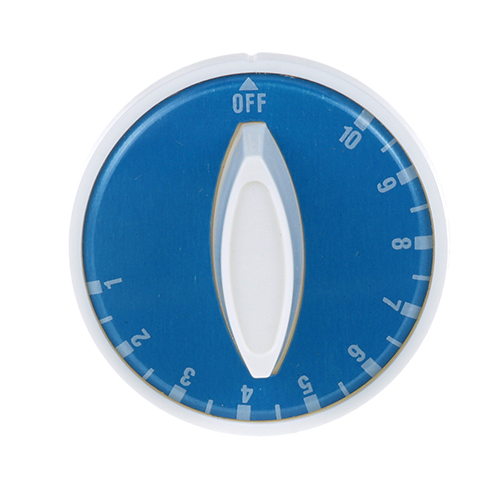

Duke 2190-2 Food Warmer Knob 2" DIA Off-10-1
Specifications:
| Attribute | Details |
|---|---|
| T'Stat Knob | |
| [ 2" Dia ] [ Off-10-1] [Mount .187] [Flat D] , | |
| White Knob W/ Blue Overlay | |
| Used With T'Stat # 46-1119 | |
| Duke | |
| Warmer Aerohot, Thurmaduke. |
Description
More Information:
- DUKE:212190 ,2190 ,2190-2
Step1: Turn off appliance and disconnect power supply before starting installation.
Step2: Remove existing knob by pulling it straight off the control shaft carefully.
Step3: Align the knob with shaft notch ensuring correct orientation.
Step4: Push knob firmly onto shaft until fully seated and test smooth rotation.
Step5: Restore power supply and verify all settings operation correctly after installation.
Step6: Wear protective gloves and ensure appliance remains cool during handling.
Customer Reviews
No reviews yet. Be the first to write one!
Write a Review
-
What maintenance is required for the Duke 2190-2 Duke knob?
Keep the knob clean by wiping away grease and debris to prevent buildup that can affect grip and operation. Periodically check for looseness and secure it firmly to the control shaft. Inspect for cracks or wear that may impact operationality. Avoid excessive force during use.
-
What are common issues with the Duke 2190-2 Duke knob?
- Knob becoming loose or slipping on the shaft.
- Cracking or breaking due to repeated use.
- Difficulty turning due to internal wear.
- Misalignment affecting accurate control settings.