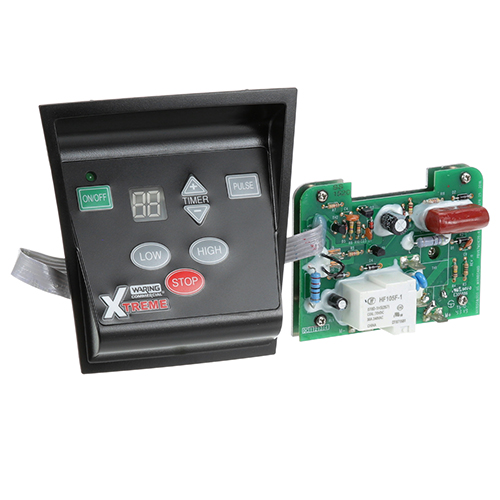

Waring/Qualheim 36398 Blender Control Panel MX1100XT
Specifications:
| Attribute | Details |
|---|---|
| Color | Black |
| Material | Plastic |
| Length | 5" | 127 mm |
| Width | 5" | 127 mm |
| Note | Used On Fmp# 222-1310 Blender |
Description
More Information:
- WARING:028390 ,029810 ,036398 ,28390 ,29810 ,36398 ,WAR029810 ,WAR036398 ,WAR28390 ,WAR29810 ,WAR36398
Step1: Disconnect the blender from power supply to prevent electrical shock before starting installation.
Step2: Remove the base screws and carefully open the housing to access the control panel.
Step3: Disconnect the wire harness from the old control panel and remove the mounting screws.
Step4: Position the new control panel, secure it with screws, and reconnect the wire harness firmly.
Step5: Reassemble the housing, tighten screws, restore power, and test blender operations safely.
Customer Reviews
No reviews yet. Be the first to write one!
Write a Review
-
What maintenance is required for the Waring 36398 Blender Control Panel?
Keep the control panel clean and dry by wiping with a soft cloth to prevent residue buildup. Inspect connectors and wiring periodically for looseness or corrosion. Regular upkeep ensures consistent operation and reduces risk of electrical faults. Avoid water exposure during cleaning or servicing.
-
What are common issues with the Waring 36398 Blender Control Panel MX1100XT?
- unresponsive control inputs.
- intermittent signal loss between panel and unit.
- display or indicator failure.
- loose connector contact causing erratic operation.
- button sticking or inconsistent response.
- corrosion at terminals leading to instability.