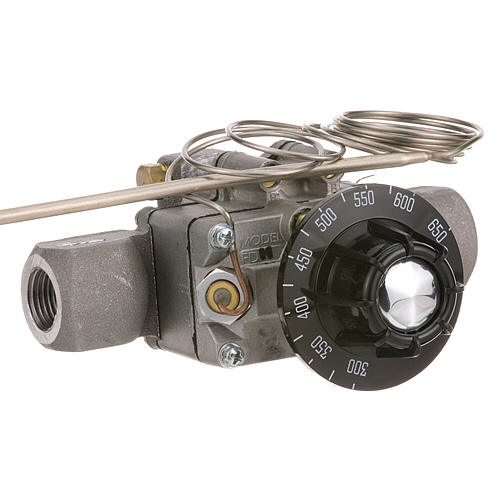

Blodgett 7707 Thermostat 300-650°F
$769.39
Price reduced from
$899.87
Specifications:
| Attribute | Details |
|---|---|
| Fdh Body Type 2 Thermostat 300° To 650°F, 48" Long Capillary | |
| Includes | Dial |
| Inlet | 1/2" Npt |
| Length | 14-3/4" Bulb, 48" Capillary |
| Outlet | 1/2" Npt |
| Outside Diameter | 3/16" Bulb |
| Temp Range | 300 To 650 F |
| Type | Fdh |
| Weight | 1.434 Lb |
| Models Used In | |
| Blodgett 1000, 1048, 1060, 999 |
Description
The Blodgett 7707 Thermostat is a temperature control component to be used in commercial systems. It controls the temperature inside and switches the heating system on and off to keep the temperature desired by the operator within the range of 300° to 650 degrees Fahrenheit. This thermostat is fitted in the control panel and is linked to a sensing bulb positioned in the cooking cavity, and is the vital element in heat control. In a restaurant, it assists in maintaining a similar performance in baking and roasting by ensuring that there is no change in temperature.
More Information:
Step1: Disconnect power/gas and ensure oven is fully cool before starting to avoid injury or burns.
Step2: Remove control panel to access old thermostat and carefully note capillary tube routing.
Step3: Disconnect and replace thermostat, positioning sensing bulb in original placed without bends or damage.
Step4: Reassemble unit, restore power, and test temperature control for proper cycling and accurate operation.
Customer Reviews
No reviews yet. Be the first to write one!
Write a Review
Thank you! Your review has been submitted.
-
What maintenance is required for the Blodgett 7707 Thermostat?
Inspect thermostat calibration regularly to ensure accurate temperature control. Clean external housing and check capillary tube for kinks or damage. Tighten electrical connections and replace unit if erratic readings occur.
-
What are common issues with the Blodgett 7707 Thermostat?
- Inaccurate temperature regulation due to worn sensing element.
- Failure to engage heating cycle or delayed response.
- Faulty calibration causing overheating or underheating issues.
- Damaged capillary tube or loose wiring connections.