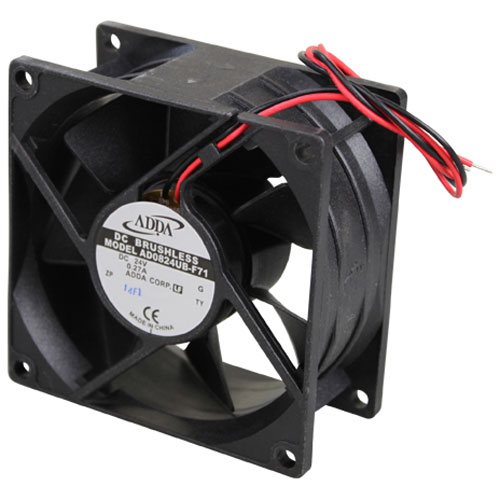

Groen 153505 Brushless Axial Fan 3-1/4" X 3-1/4" X 1-1/2"
$49.46
Price reduced from
$70.65
Specifications:
| Attribute | Details |
|---|---|
| 24V Dc, .27A, Brushless, 3-1/4" Square X 1-1/2" Thick |
Description
The Groen 153505 Brushless Axial Fan is a small but powerful cooling tool that works well and stays running smoothly. This fan works well thanks to its 3-1/4" x 3-1/4" x 1-1/2" size and a brushless motor that keeps wearing parts to a minimum while lasting longer. It helps lower energy costs while keeping rooms cool using different better its strong build works well in both commercial kitchens, refrigerators, and industrial cooling systems. The fan installs without hassle and works well, keeping cool air flowing steadily to keep your equipment running.
More Information:
- GROEN:153505
Step1: Disconnect power and allow equipment to cool before starting.
Step2: Remove access panel and note existing fan orientation and wiring.
Step3: Unplug old fan and detach mounting screws carefully.
Step4: Position new axial fan in same airflow direction.
Step5: Secure with screws and reconnect wiring harness firmly.
Step6: Replace cover and restore power.
Customer Reviews
No reviews yet. Be the first to write one!
Write a Review
Thank you! Your review has been submitted.
-
What maintenance is required for the Groen 153505 Brushless Axial Fan?
Keep fan free from dust buildup and ensure proper airflow pathways inside equipment. Inspect electrical connections and mounting for tightness to prevent vibration damage. Check brushless motor operation regularly and replace unit if abnormal noise occurs.
-
What are common issues with the Groen 153505 Brushless Axial Fan?
- Reduced airflow due to dust accumulation.
- Electrical connection failure causing intermittent operation.
- Motor overheating under continuous load.
- Excess vibration from loose mounting or imbalance.
- Fan blade damage leading to reduced cooling efficiency.