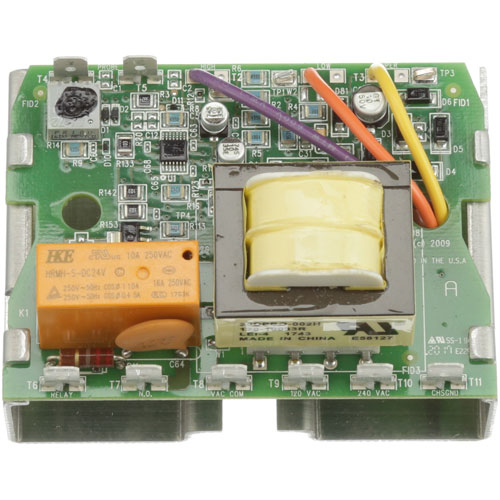
Bakers Pride M0110X Oven Temperature Control Board
$163.23
Price reduced from
$395.22
Specifications:
| Attribute | Details |
|---|---|
| Temperature Control Board | |
| Fastron Controller | |
| Bakers Pride Bco-G, Co1-E, Coh-E, Gdco-G |
Description
The Bakers Pride M0110X Temperature Control Board is an electronic part that controls the amount of temperature in commercial ovens and cooking components. It controls and regulates heating components to ensure a stable cooking performance. It is used in ovens to provide accurate temperature control to achieve consistency in preparing food and products. This control board is a part of the electrical system of the unit and assists in heat management and in maintaining optimal working conditions in professional kitchen settings.
More Information:
- APW WYOTT:1400110||BAKERS PRIDE:1400110 ,AS-1400110 ,M0110X||BEVLES:1400110||TRI-STAR:1400110 ,AS-1400110 ,TRS1400110
Step1: Power off and unplug the oven.
Step2: Remove the control panel screws and access the old board.
Step3: Disconnect all wires, labeling each for easy reinstallation.
Step4: Unscrew and remove the old control board.
Step5: Mount the new board and reconnect wires exactly as before.
Step6: Reattach the control panel.
Step7: Turn on the oven and verify that temperature settings respond correctly.
Customer Reviews
No reviews yet. Be the first to write one!
Write a Review
Thank you! Your review has been submitted.
-
What maintenance is required for the Bakers Pride M0110X Temperature Control Board?
Check the oven board for loose or corroded connections. Inspect for signs of burning or component damage. Keep the surrounding area free of debris to ensure efficient and accurate temperature regulation.
-
What are common issues with the Bakers Pride M0110X Temperature Control Board?
- Inaccurate temperature readings or fluctuations.
- Intermittent or unresponsive oven controls.
- Burnt or damaged circuit traces.
- Loose or corroded wiring connections.
- Oven failing to maintain consistent heat.
- Erratic operation reducing overall efficiency.