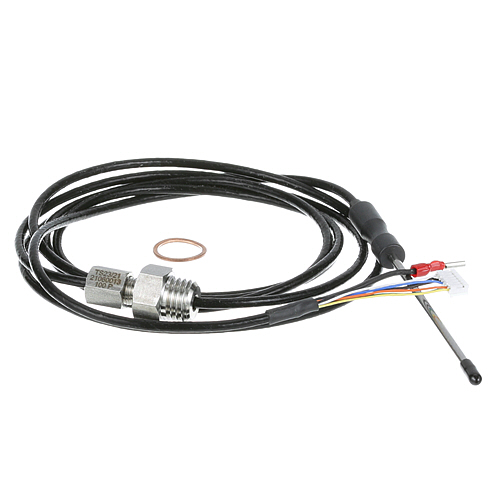

Rational 40.02.100P Meat Probe Sensor
Description
More Information:
| Manufacturer Name: Rational Product Number: 40.02.100P OEM Part Number: 40.02.100P Product Description: Meat Probe Sensor Similar Models:NONE Dimensions: Length:8.5in/21.59cm Width:6.25in/15.88cm Height:0.5in/1.27cm Weight:0.3lbs/136.08g |
Choose the best Commercial kitchen & Restaurant equipment parts and supplies from {{config path='general/store_information/name'}}!
Same Day Shipping
Best Quality And Best Price
Wide Range of Inventory
Best Customer Service
Have More Questions or Need Help to Place The Order?
Reach us at {{config path='general/store_information/phone'}} or {{config path='trans_email/ident_support/email'}}
- RATIONAL:40.02.100P ,RAM40.02.100P
Step1: Switch off and disconnect power to the unit for safety.
Step2: Allow the unit to cool completely to prevent burns or probe damage.
Step3: Open the control panel or probe connection port access area.
Step4: Disconnect the existing probe sensor from its socket carefully.
Step5: Insert the new probe sensor connector fully into the port until it locks in place.
Step6: Route the probe cable through the designated channel away from hot surfaces.
Step7: Restore power and test the probe reading inside the control display for accuracy.
Customer Reviews
No reviews yet. Be the first to write one!
Write a Review
-
What maintenance is required for the Rational 40.02.100P Meat Probe Sensor?
Clean the probe after every use to remove grease and food residue that can affect temperature accuracy. Inspect the cable and sensor tip for bends, cracks, or heat damage. Keep the connector dry and free from corrosion. Proper handling ensures accurate readings during cooking operations.
-
What are common issues with the Rational 40.02.100P Meat Probe Sensor?
- Damaged or frayed probe cable.
- Loose or faulty oven connection.
- Slow response during cooking cycles.
- Contamination buildup on probe tip.
- Failure due to moisture or heat exposure.