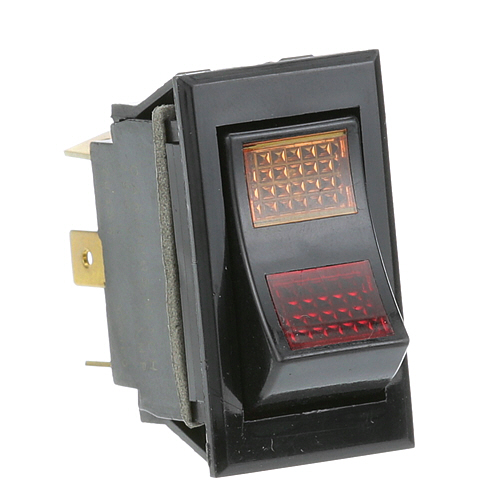
BKI (Barbeque King) S0104 Rocker Switch W/ Red & Amber Light 6x1/4" Tab Terminals
$91.28
Price reduced from
$119.01
Specifications:
| Attribute | Details |
|---|---|
| Rocker Switch, On/Off/On | |
| Black With Red And Amber Light, 10A@250Vac, 15A@125Vac | |
| (6) 1/4" Tab Terminals | |
| Barbecue King (Bki) Fryers Alf-F, Alf-Fc, Blf-F, Blf-Fc, | |
| Fkm, Fkm-F, Fkm-Fc, Lgf, Lgf-F, Lgf-Fc, Lpf, Lpf-F, Lpf-Fc |
Description
The BKI (Barbeque King) S0104 Fryer Rocker Switch 15A 250V DPDT is an electrical current switch that activates and deactivates the operations of the fryer by moving the points of the contact between two internal circuits. It has a double-pole, double-throw design that enables it to switch both sides of the power line simultaneously with a tight mechanical action and has a rocker-style external actuator to maintain the uniform finger contact.
More Information:
- BK INDUSTRIES:S0104
Step1: Disconnect the equipment from the electrical supply before starting installation.
Step2: Remove the control panel cover to access the existing rocker switch.
Step3: Label and disconnect the wires from the old switch terminals carefully.
Step4: Insert the new S0104 rocker switch into the panel opening and secure it firmly.
Step5: Reconnect the wires to the correct tab terminals.
Step6: Restore power and test both indicator lights and switch operation properly.
Customer Reviews
No reviews yet. Be the first to write one!
Write a Review
Thank you! Your review has been submitted.
-
What maintenance is required for the BKI S0104 Rock Switch?
Inspect the rocker for smooth operation and ensure the red and amber lights illuminate correctly. Verify wiring terminals are secure, and power off the fryer before testing to prevent electrical hazards.
-
What are the common issues with the BKI S0104 Rock Switch?
- Rocker sticks or fails to connect.
- Indicator lights do not illuminate.
- Loose or corroded wiring connections.
- Cracked or warped switch housing.