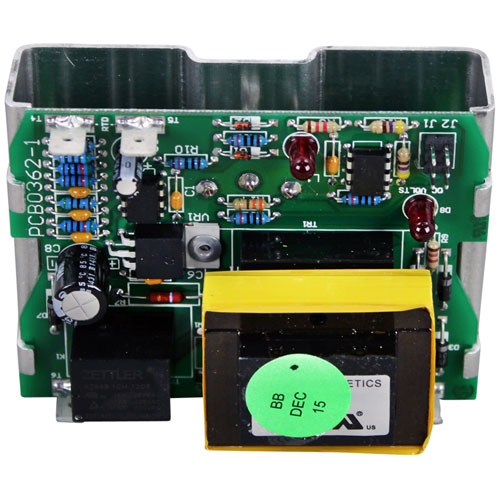

Southbend SOU1181998 Control Board W/ Potentiometer & Bracket
$274.12
Price reduced from
$525.13
Specifications:
| Attribute | Details |
|---|---|
| Control Board W/ Potentiometer & Bracket | |
| Pot Has 1/4" Round Stem | |
| 8Ea 1/4" Tab Terminals | |
| Pointer Dial To Use A2644, # 22-1255 | |
| Southbend "Cook Only" | |
| Oven Series | Eb, Es, Gb, Gs, Sleb, Sles, Slgb, Slgs. |
| *All Units Must Have "Sc" (Standard Control) Suffix. | |
| For Temp Probe Use # 44-1220 |
Description
The Southbend SOU1181998 Control Board W/ Potentiometer & Bracket is an electrical signal that controls the input of and directs the control commands to the other components. The board understands the changes in the form of the modulation of the operational parameters and ensures the coordination of the system. It is fitted in the compartment of the equipment, and is firmly fixed with the bracket attached to it. This was designed as an integrated assembly to facilitate the same communication between user-adjustable inputs and internal circuitry, and forms the core of ensuring that it is compatible with compatible cooking equipment setups.
More Information:
- MIDDLEBY MARSHALL:1181998||SOUTHBEND:1175024 ,1175025 ,1181998 ,SOU1175024 ,SOU1181998||STAR MFG:1181998
Step1: Turn off power and unplug the unit to avoid electric shock.
Step2: Remove the access panel using a screwdriver.
Step3: Locate and disconnect wiring from the old control board.
Step4: Unscrew and remove the existing board and bracket.
Step5: Mount the new board with bracket securely in place.
Step6: Reconnect wires to matching terminals.
Step7: Reattach the panel, restore power, and test functionality.
Customer Reviews
No reviews yet. Be the first to write one!
Write a Review
Thank you! Your review has been submitted.
-
What maintenance is required for the Southbend SOU1181998 Control Board?
Keep the control board clean, dry, and free from grease buildup. Regularly inspect wiring connections and the potentiometer for looseness or wear. Preventive support ensures accurate operation and reduces electrical faults. Always disconnect power before servicing for safety.
-
What are common issues with the Southbend SOU1181998 Control Board?
- No power or intermittent startup.
- Unresponsive or frozen control board.
- Erratic temperature regulation signals.
- Potentiometer malfunction or drift.
- Loose or damaged wiring connections.
- Burned or shorted electronic components.