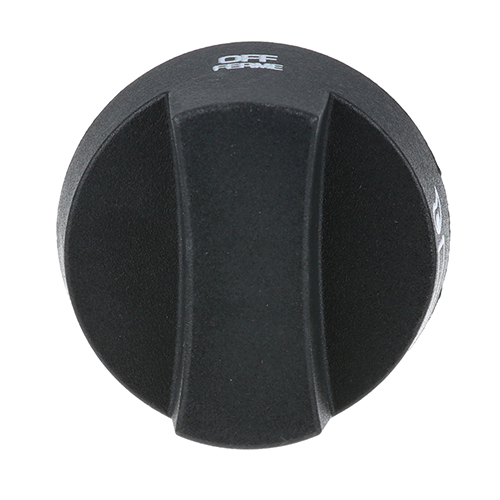

TEC SPCK Knob Off-On-Sim 2" DIA
$4.32
Specifications:
| Attribute | Details |
|---|---|
| [ 2" Dia ] [ Off-On-(Sim)] [Mount .240"] [ Flat Down ] | |
| Set Screw Left, Note | New Style Knob, No Set Screw. |
| Tec (Thermal Engineering Corp) |
Description
The TEC SPCK Knob Off-On-Sim is a 2" DIA that can be used to switch the power on or off or choose a concurrent setting of the appliance. It operates in a rotary fashion that enables the user to alternate the off position, the on position and a simultaneous position as required. This knob is fitted on the front control panel and it is directly connected to the switch assembly of the appliance. Its place can be accessed to adjust power or operating modes.
More Information:
- TEC:SPCK ,SPCK2 ,Y-SPCK ,Y-SPCK2||VULCAN HART:00-851800-00907 ,851800-00907 ,851800-907||WITTCO:00-851800-00907 ,851800-907 ,Y-SPCK2
Step1: Turn off gas or power supply.
Step2: Remove the old knob by pulling it off the shaft.
Step3: Align the new knob with the control shaft.
Step4: Push it firmly into place.
Step5: Turn to ensure smooth operation.
Step6: Restore power or gas and test operation.
Customer Reviews
No reviews yet. Be the first to write one!
Write a Review
Thank you! Your review has been submitted.
-
What maintenance is required for the Tec SPCK Knob?
Regularly inspect the knob for cracks or wear and ensure it rotates smoothly. Clean with a damp cloth to remove dust and debris. Avoid harsh chemicals that may damage the material. Tighten any loose fittings to maintain safe and consistent operation.
-
What are common issues with the Tec SPCK Knob?
- Knob becoming loose or wobbly.
- Cracks or chips in the surface.
- Difficulty turning due to debris buildup.
- Fading or wear of markings over time.