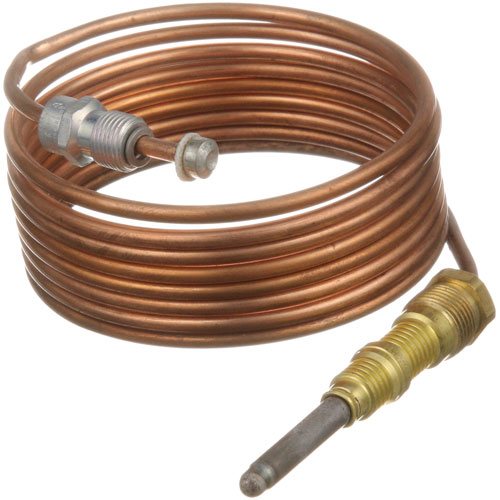

Bakers Pride M1296X Oven Thermocouple 72" Long
Specifications:
| Attribute | Details |
|---|---|
| Heavy-Duty 72" Thermocouple, 20-30 Milevolt. | |
| Coaxial Thermocouple Threads = 11/32"-32 |
Description
More Information:
- BAKERS PRIDE:AS-M1296A ,BKPM1296A ,BKPM1296X ,M1296A ,M1296X||COOKING PERFROMANCE GROUP:351302170058||HOBART:00-428305-00001 ,428305-00001 ,428305-1 ,HOB00-428305-00001 ,HOB428305-00001 ,HOB428305-1||VULCAN HART:00-412788-00060 ,00-428305-00001 ,412788-60 ,428305-00001 ,428305-1 ,VH00-428305-00001 ,VH428305-00001 ,VH428305-1
Step1: Turn off the gas supply and disconnect the oven from power.
Step2: Remove the old thermocouple from the burner assembly.
Step3: Clean the burner connection area to ensure proper contact.
Step4: Install the new thermocouple, inserting it securely into the pilot flame bracket.
Step5: Reconnect the thermocouple wiring to the gas valve.
Step6: Restore gas and power, then test for proper pilot operation and flame safety.
Customer Reviews
No reviews yet. Be the first to write one!
Write a Review
-
What maintenance is required for the Bakers Pride M1296X Thermocouple?
Inspect the thermocouple regularly for physical damage, corrosion, or loose connections that may affect flame detection. Ensure the 72-inch lead is properly routed and not pinched or exposed to excessive heat. Clean the sensor tip gently to remove grease buildup for accurate millivolt readings. Always shut off gas and power before servicing to maintain safety.
-
What are common issues with the Bakers Pride M1296X Thermocouple?
- Erratic or inaccurate temperature readings.
- Open or shorted wiring.
- Corroded or burned tip.
- Intermittent oven ignition failure.