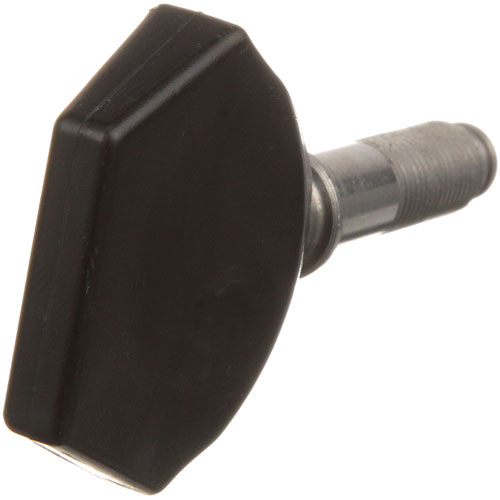
Hobart 00-108197-00005 Slicer Carriage Thumb Screw 3/8"
Specifications:
| Attribute | Details |
|---|---|
| Carriage Thumb Screw 3/8"-24 Male Thread | |
| Hobart Slicer 1612, 1712 |
Description
More Information:
- HOBART:00-108197-00005 ,00-108197-5 ,108197-5
Step1: Disconnect power to the slicer and ensure the blade guard is in place before servicing.
Step2: Move the carriage to a stable, locked position to prevent movement during installation.
Step3: Remove the old thumb screw by turning counterclockwise from the carriage assembly.
Step4: Thread the new screw into the mounting point, ensuring proper alignment with the carriage guide.
Step5: Tighten securely by hand without over-torquing to avoid damaging threads.
Step6: Test carriage movement to confirm smooth locking and safe operation.
Customer Reviews
No reviews yet. Be the first to write one!
Write a Review
-
What maintenance is required for the Hobart 00-108197-00005 Carriage Thumb Screw?
Clean the slicer thumb screw regularly to remove food debris and grease buildup. Inspect threads for wear or damage to ensure smooth tightening. Lightly lubricate if needed and avoid over-tightening to prevent stripping or carriage misalignment.
-
What are common issues with the Hobart 00-108197-00005 Carriage Thumb Screw?
- Stripped or worn threads causing poor fastening.
- Slicer screw loosening during slicer operation vibrations.
- Rust or corrosion from moisture exposure.
- Difficulty tightening due to debris buildup.
- Carriage misalignment or wobble affecting slicing accuracy.